 ben's notes
Extra Topics
Malware #
Malware is a catch-all term for malicious software, and can also be known as malcode or potentially unwanted application (PUA). Malware includes:
- File deleting software
- Spam email senders
- DoS attack platforms
- Rootkits that hide in the OS
- And so on
Self-replicating code #
One thing that malware needs to do in order to become effective is spread quickly. One method to do so automatically is to write self-replicating code, which outputs a copy of itself and propagates onwards. Self-replicating code is extremely dangerous and should never be written intentionally.
Viruses and worms both self-propagate.
- Viruses require user action to propagate. They usually alter some stored code on the computer, and spreads when the user runs the code.
- Worms do not require user action to propagate, and usually alter currently-running code.
Propagation Strategies #
- Infect existing code that will be executed by user: for example, code that runs on program or OS startup
- Modifying existing code to include malcode: for example, injecting code into emails to automatically run on open
- Polymorphic code: viruses can encrypt itself, and insert the key and the decryptor in addition to the encrypted code. This mitigates signature-based detection and obfuscates the code.
- To mitigate this, we can try detecting the decryptor code, or check if the code performs decryption.
- Metamorphic code: Each time the virus propagates, it generates a semantically different version of the code:
- Use different registers
- Change order of if/else
- Flip booleans from
trueto!false - Add junk code that is never executed or does nothing
- To detect metamorphic code, one strategy is to flag unfamiliar code by matching its hash with a global table of familiar code. If new code is detected, treat it as suspicious and investigate it.
- Brute force IP addresses: try connecting to random IP addresses until one succeeds, then spread the code there.
Detection Strategies #
- Signature-based detection: look for parts of a program that match known code from viruses.
Anonymity #
Anonymity is the act of concealing your identity.
- Anonymity is not confidentiality: the former hides the person sending the message; the latter hides the message itself.
- Anonymity is very difficult to achieve over the internet since packets contain the source and destination IP address.
Proxies #
A proxy is a third party that relays internet traffic. This is different from VPNs because proxies act on the application level, whereas VPNs act on the network level.
Proxies can be costly in terms of money and performance. In addition, we must trust the proxy since it can see sender and recipient identities.
Tor #
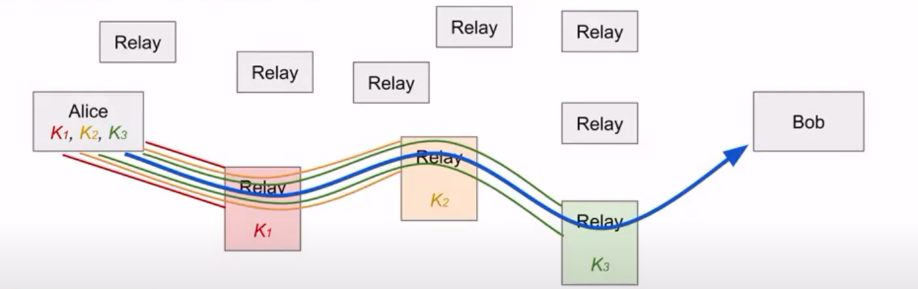
Tor (the Onion router) is a network that uses multiple proxies (relays) to enable anonymous communications.
The main features of Tor are client anonymity, censorship resistance, and server anonymity (onion services).
Tor communications occur through a circuit of 3 or more relays, in which each relay only knows the two adjacent relays. When Alice sends the message, she wraps the message in three encryption layers.
Weaknesses #
- Network attackers who have full view of a network can exploit timing attacks to see when Alice sends a message and when Bob receives a message, then link the two together.
- Global adversaries such as this are outside of Tor’s threat model.
- Collusion can break anonymity: if nodes collaborate, they can act maliciously.
- Using Tor does not hide the fact that you are using Tor.