 ben's notes
Networking
What is the Internet? #
A network is a set of connected machines that can communicate with each other through some agreed protocol.
- A protocol is a shared agreement on syntax (structure, format, order of messages) and semantics (what actions to take when a message is received)
The Internet is a global network of computers (also known as a network of networks). (For a full networking course’s treatment of every layer below — including how TCP, BGP, and DNS actually work — see internet organization and layers. This page focuses on the security properties and attacks at each layer.)
The OSI Model #
Idea: layer a bunch of protocols so that different levels of hardware/software can interact with each other.
- Each layer relies on services below it and provides information for services above it.
- Layers 5-6 are deprecated and are never used.
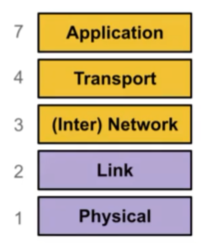
Layer 1: Physical Layer #
Purpose: Sends bits from one device to another with EE magic.
Examples: Wifi, ethernet
Wifi #
A layer 1/2 protocol that wirelessly connects machines in a local access network (LAN). It’s very similar to ethernet in configuration and capabilities. A wifi network consists of the following:
- Access point: A router/machine that helps you connect to the network
- SSID: The name of the wifi network
- Password: Used to secure communications
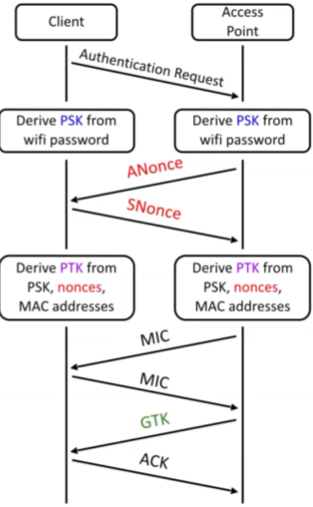
Wifi is secured using Wi-Fi Protected Access 2 (WPA2), using WPA Pre-Shared Keys (WPA-PSK). A WPA handshake works as follows:
- The client sends an authentication request to the access point.
- Both the client and AP use the password to derive the PSK.
- Both exchange random nonces.
- Both use the PSK, nonces, and MAC (Media access controller) addresses to derive the PTK (pairwise transport keys).
- Both exchange Message Integrity Codes (MICs, or MACs from crypto) to ensure integrity of derived keys
- Access point sends the group temporal key (GTK)
- The client acknowledges receipt of GTK
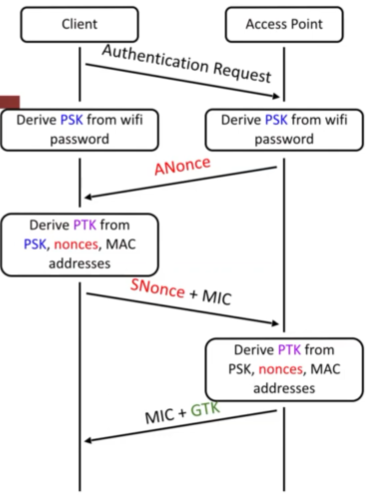
An improved version is the WPA 4-way handshake:
- The client sends an authentication request to the access point.
- Both use the password to derive the PSK.
- The access point sends
ANonceto the client. - The client generates
SNonceand derives the PTK. - The client sends
SNonceand its MIC to the access point. - The access point derives the PTK.
- If the PTK’s match, then the AP sends its MIC and GTK to the client.
- The client acknowledges the GTK.
The 4-way handshake is more efficient than the basic handshake.
WPA-Enterprise: Every user has their own username and password. Instead of using a PSK, use a randomly generated key by an authentication server, and remember the certificate after initial authentication.
WPA-3 (Dragonfly, simultaneous authentication of equals): Allows for the creation of shared passwords, and is based off Diffie-Hellman.
- Main idea: So in normal Diffie-Hellman, we have two public parameters, $p$ and $g$. Alice has a secret $a$ and sends $g^a \mod p$ to Bob, and Bob does the same thing with $b$. Their secret is thus $g^{ab} \mod p$. Well, what if $g$ was no longer public? Dragonfly creates a secret $g$ based on a hash, Alice and Bob’s ID’s, and a counter, and keeps incrementing the counter until it finds a valid element.
- WPA-3 adds a Dragonfly key exchange before the standard WPA handshake, and the password from WPA2 is replaced with the generated shared secret.
Layer 2: Link Layer #
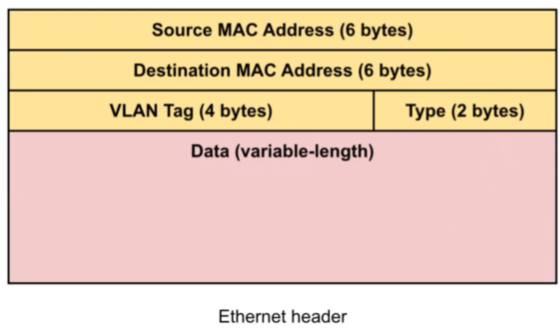
Purpose: Sends frames directly from one device to another within a network (i.e. encodes bits into groups).
- Frames consist of at least 3 things:
- Source (who sent the message)
- Destination (who should receive the message)
- Data (what does the message say)
Examples: ethernet frame (illustrated below)
Layer 3: Network Layer #
Purpose: Send packets from any device to any other device, regardless of if they are on the same network or not
Examples: IP (internet protocol)
Packets are sent to a router, which determines how to get the packet to its destination. The route taken to the destination is abstracted away from the user and could include many different networks/layers/protocols.
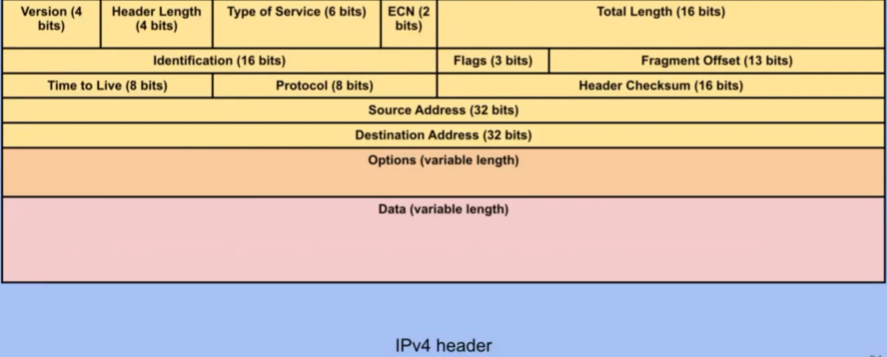
Reliability: ensures that packets are either received correctly or not at all (using a checksum).
- No guarantee that attacker didn’t modify data since no cryptographic MAC included
- IP is unreliable and only provides best effort
- Layer above has the job of ensuring things are more reliable
IP #
The universal layer-3 protocol that all devices use to transmit data over the Internet. All devices have IP addresses.
Networks are divided up into subnets. Subnets are denoted by a prefix followed by its length (for example, 128.32.0.0/16 is an IPv4 subnet for all address that begin in 128.32. The 16 specifies that 128.32 has 16 bits in it.)
To route packets in a local network:
- Verify that the destination IP is in the same subnet
- Use ARP (below) to get the destination MAC address
- Send the packet directly to the destination
To route packets over the Internet:
- Use ARP to get the destination gateway’s MAC address
- Send the packet to the gateway
- Let the gateway handle local routing
ARP #
ARP (Address Resolution Protocol) is used to translate layer 3 IP addresses to layer 2 MAC addresses.
- On the local network, there are four steps:
- Check cache to see if you know recipient’s MAC address
- If not, broadcast to everyone on LAN to ask for the MAC address
- If there is a match, then the machine with that MAC address replies. Everyone else does nothing.
- Save MAC in cache
- If the recipient is on a different network, you can send frames directly to a gateway router instead, but the same principle applies.
- ARP is easy to attack using ARP spoofing when attackers create a race condition and can return their own MAC address for any request instead of the desired one.
- Defenses: physical network switches,
arpwatch
- Defenses: physical network switches,
DHCP #
DHCP (Dynamic Host Configuration Protocol): When a user first joins a network:
- The client broadcasts a request for configuration (client discover).
- DHCP Offer: A DHCP server responds with a configuration.
- Client Request: The client broadcasts the configuration it chose (if multiple servers sent offers).
- DHCP Acknowledgement: The server confirms the configuration.
- Just like ARP, DHCP is vulnerable to spoofing and race conditions (attackers can pretend to be DHCP server and send malicious configurations).
BGP #
Border Gateway Protocol: used for communicating between different autonomous systems on the Internet. (For the policy-vs-shortest-path tradeoffs, customer/provider/peer relationships, and convergence behavior, see interdomain routing (bgp).)
- Every AS handles internal routing, has a unique autonomous system number (ASN), is comprised of one or more local networks, and can forward packets to connected AS’s.
- In BGP, every router announces what networks it can provide and the path to those networks. It attempts to use preferred routes (no loops, fastest)
Layer 4: Transport Layer #
Provides: transportation of variable-length data from any point to any other point
Examples: TCP (reliability, ports), UDP (ports, no reliability)
- UDP best used for real-time communication where delays are more detrimental than dropping packets
TCP #
A stream protocol to send a bunch of packets in order, reliably. (For the full mechanics — sequence numbers, sliding windows, retransmission, congestion control — see TCP and congestion control.)
TCP provides a reliable in-order bytestream abstraction where bytes can go in on one end, and come out at the other end accurately. A bytestream can be thought of as a pipe between the sender and receiver.
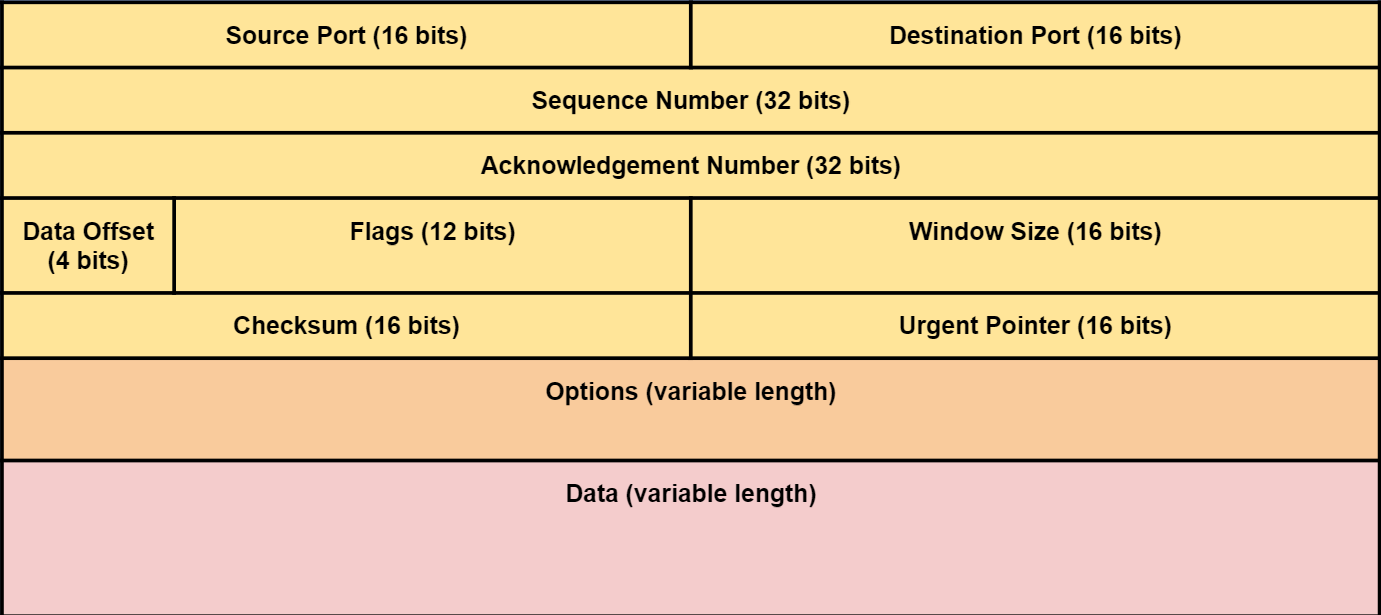
- Segments contain sequence numbers so they can be reassembled in the right order.
- The destination must send acknowledgements for each sequence number. If the acknowledgement is not received by the sender, then the packet gets sent again.
- Before starting a TCP connection, the client and server must agree on a set of two initial sequence numbers (ISNs) which are random for each connection.
- Multiple services can share the same IP address if they use different port numbers.
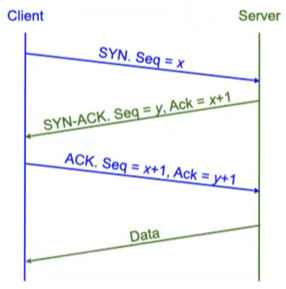
The TCP Three-way handshake
- Client chooses an ISN and sends a SYN (synchronize) packet.
- The server receives the SYN packet, chooses an ISN, and responds with a SYN-ACK packet.
- The client returns with an ACK packet. The connection is now established.
TCP Flags
- ACK: user acknowledgement of receiving data
- SYN: beginning of the connection
- FIN: a way to end the connection that requires an acknowledgement. No longer sending packets, but can keep receiving
- RST: another way to end the connection that does not require acknowledgement, and immediately ends both sending and receiving.
UDP #
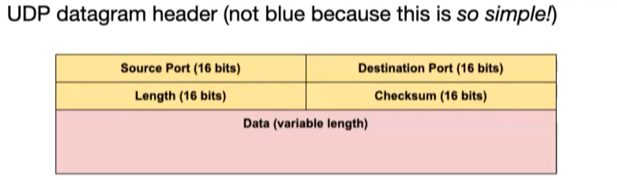
User Datagram Protocol: provides a datagram abstraction for individual message delivery
- Messages sent in a single layer-3 packet
- Sent and received in a single unit, unlike TCP datastream
- No reliability or ordering guarantees
- Much faster than TCP due to lack of 3-way handshake (useful for realtime communications)
TLS #
Transport Layer Security: a secure overlay that exists on top of layer 4 (sometimes known as layer 4.5). TLS is built on top of TCP, and provides confidentiality, integrity, and authenticity to datastreams.
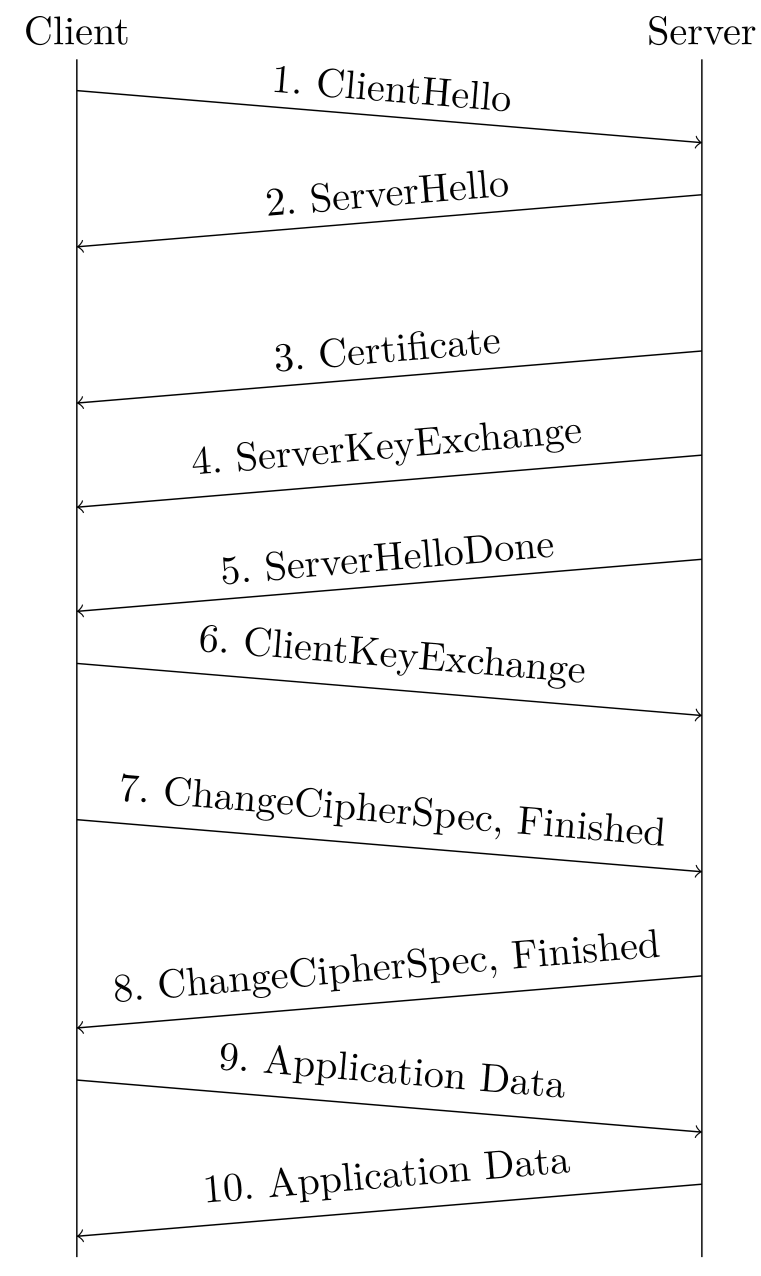
TLS Handshake
- Exchange Hellos:
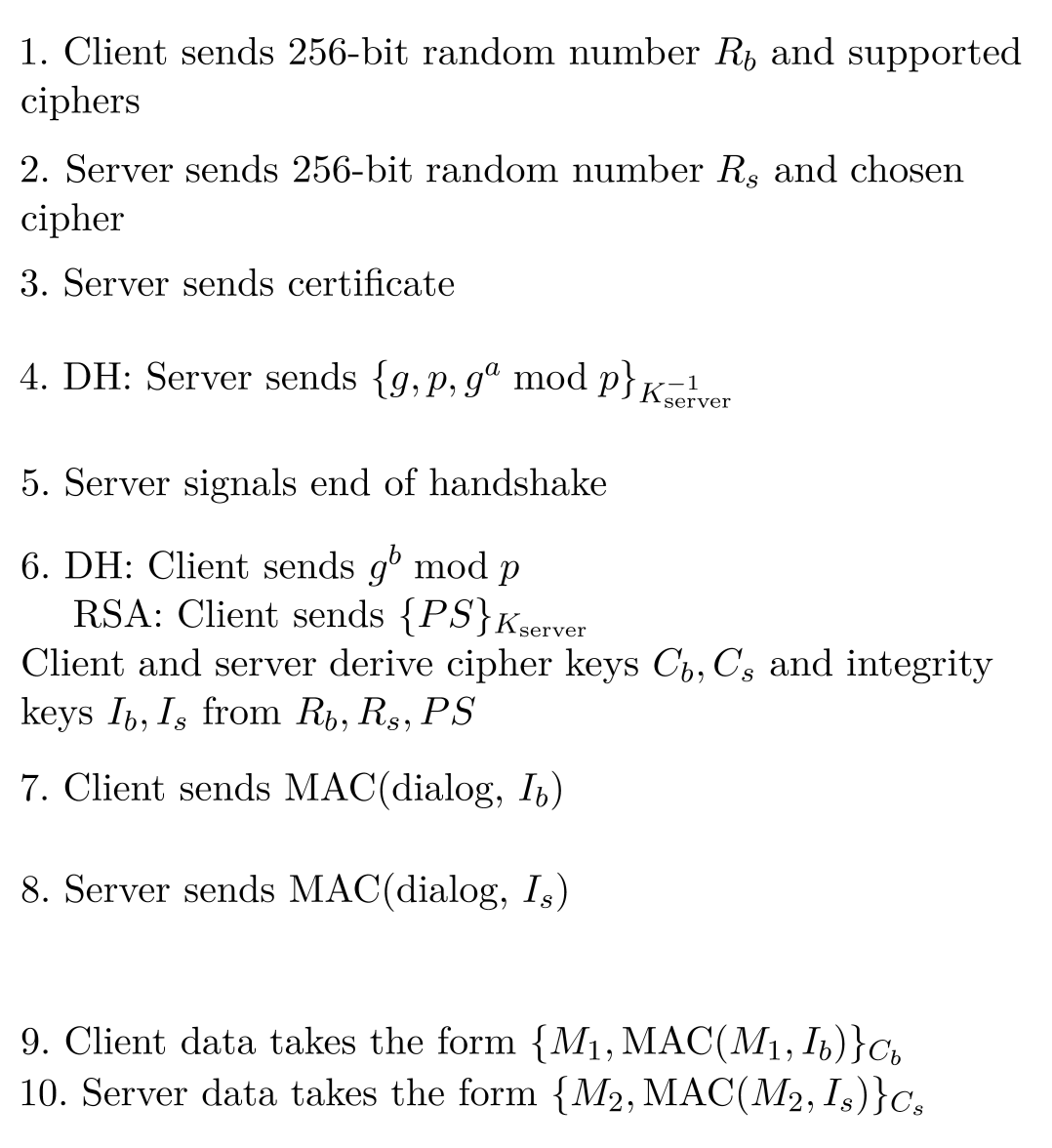
- Client sends ClientHello with a 256-bit random $R_B$ and a list of supported cryptographic algorithms.
- The server responds with a ServerHello with a 256-bit random $R_S$ and the algorithms that it will use (chosen from the client’s list).
- The purpose of ClientHello and ServerHello are to prevent replay attacks (sending the same message multiple times).
- Certificate Verification:
- The server sends its certificate (identity and public key signed by trusted CA)
- The client validates the signature.
- Premaster Secret:
- The client randomly generates a premaster secret (PS) using RSA, Diffie-Hellman, etc.(DHE guarantees forward secrecy, but RSA does not.)
- The client encrypts the PS and sends it to the server with its public key from certificate.
- Derive Symmetric Keys: The server and client each derive symmetric keys from $R_B$, $R_S$, and $PS$, typically derived by sending the same seed to a PRNG. Four keys are derived, all of which are known by both the client and server:
- $C_B$: client-to-server messages
- $C_S$: server-to-client messages
- $I_B$: MAC client-to-server messages
- $I_S$: MAC server-to-client messages
- Exchange MACs: The client and server exchange the MACs derived in the previous step to ensure that a MITM does not exist.
- Send Messages: Encrypt and MAC with the derived keys from step 4.
Networking Attacks #
Low-Level Networking Attacks #
Adversaries #
There are three main types of adversaries for networking attacks:
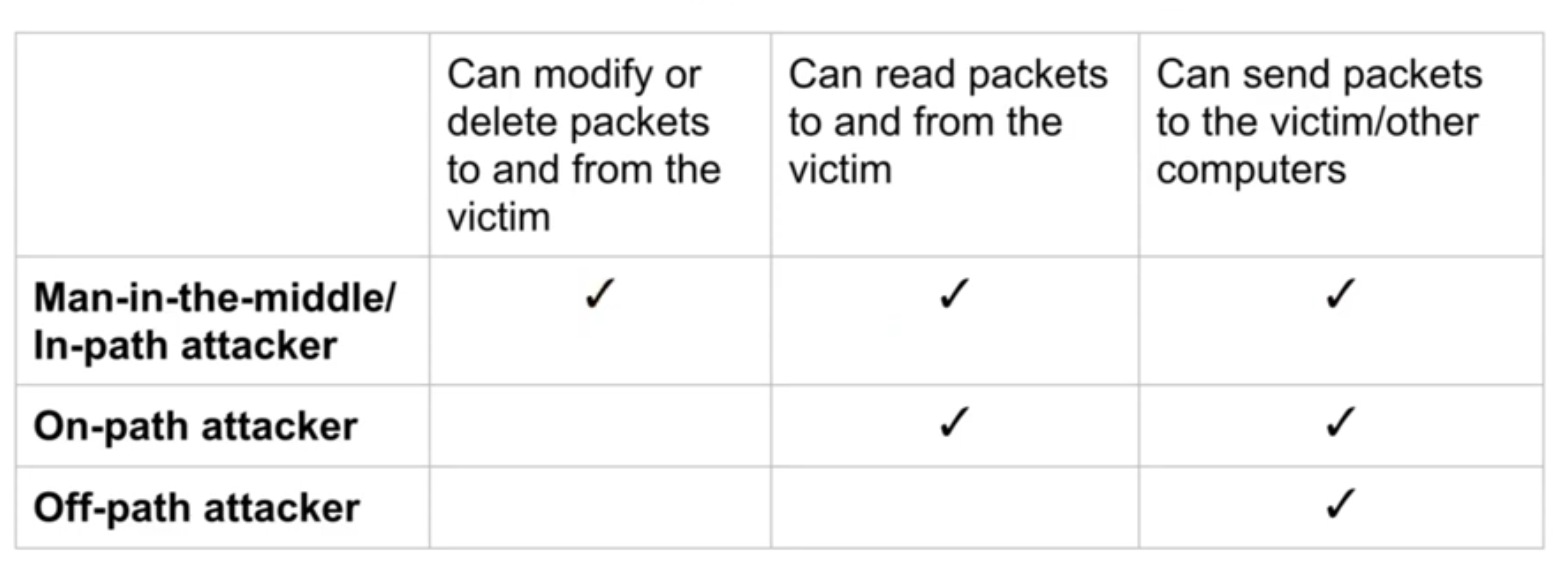
There are also:
- Offline attackers: the attacker performs all of the computation themselves and are limited only by their resources. These are much more dangerous, but can be mitigated using simultaneous authentication of equals where two parties can only generate a shared secret if both of them know a password during the protocol.
- Online attackers: the attacker interacts with the service to gain information, which is limited by the frequency and security of such interactions.
Spoofing #
Spoofing is lying about the identity of the sender by altering the source address in the packet header.
All types of attackers can spoof packets, and layers 1-3 do not prevent against spoofing.
WPA-PSK Attacks #
Rogue AP: Pretend to be an access point and offer your own ANonce to the client. This allows adversaries to complete a 4-way handshake and become a man-in-the-middle.
Offline brute-force attack: Based on nonces captured, brute force many possible passwords to see if any will derive the correct MIC.
No forward secrecy: If Eve records the value of ANonce and SNonce, they can derive the key if they know the password or PSK.
Dissociation Attack: Spoof a wifi frame that tells a client to disconnect and try reconnecting, which can be used to generate enough information for a brute-force attack.
WPA-Enterprise defends against these attacks, but is still vulnerable to higher layer attacks.
IP and BGP Attacks (Layer 3) #
All autonomous systems implicitly trust surrounding ASes.
This allows for IP spoofing where malicious clients can spoof their source IP addresses to make packets look like they’re coming from somewhere else.
BGP Hijacking allows adversaries to execute MITM attacks to intercept all broadcasts to a particular AS by claiming itself to be a gateway for a subnet it doesn’t actually own.
TCP Attacks #
TCP hijacking: tampering with an existing session to modify data into a connection
- Data injection: inject malicious data into connection
- Need to know the sender’s sequence number (easy for on-path attackers and MITM attackers. Off-path attackers must guess the 32-bit sequence number (blind injection).
- RST injection: spoof RST packet to forcibly terminate a connection
TCP spoofing: make a TCP connection appear to come from another source
- Need to know sequence number in SYN-ACK packet
- Creates a race condition (needs to send SYN-ACK before real server)
SYN Flood: denial of service attack where off-path attackers can send many SYN packets to a server to overload it
DNS #
Computers are addressed by IP addresses. However, IP addresses are not human-friendly. We would rather connect to [google.com](http://google.com) instead of 74.125.25.99!
Domain Name System (DNS) is a protocol for translating human-readable domain names into IP addresses.
Translation is handled by nameservers, which respond to DNS requests.
DNS Name Server Hierarchy #
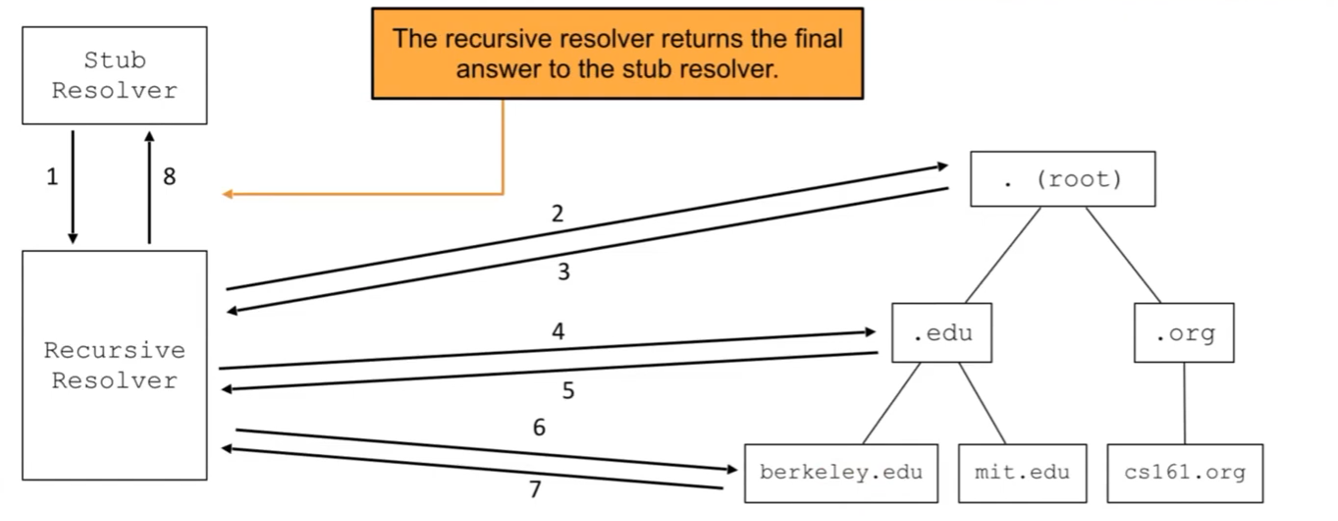
Domains have several layers, which can be organized into a tree structure:
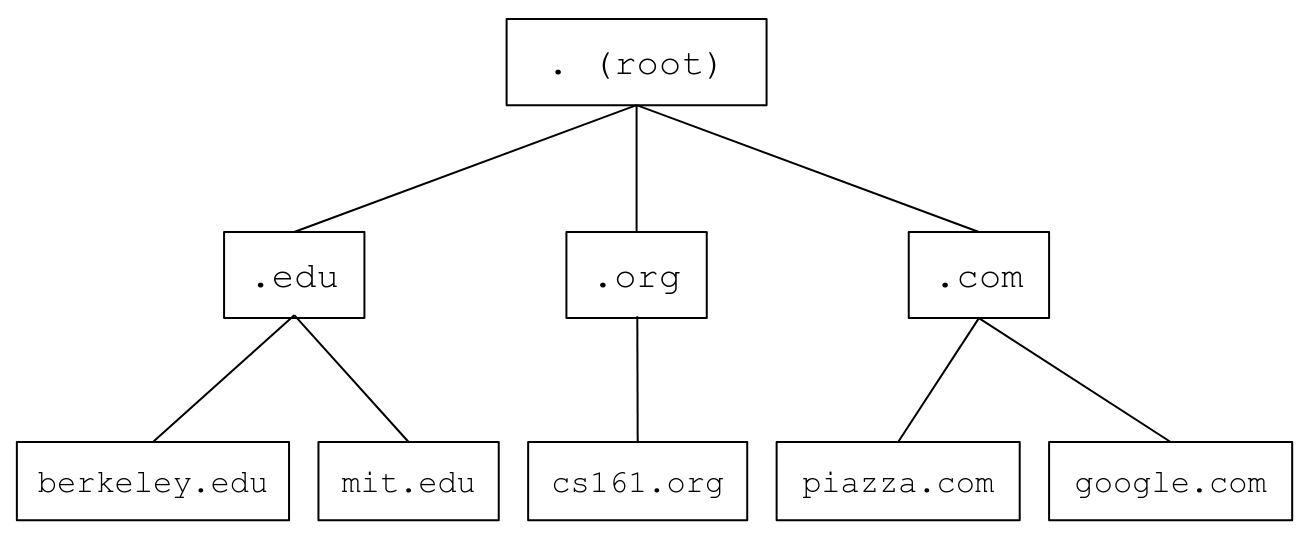
At the top is the root server which contains all of the domains in its zone.
The next levels contain the top level domains (TLD)’s such as .com. Each TLD has its own nameserver, which recursively queries until the final IP address is resolved.
In order to make this easier, there are two types of resolvers:
Stub resolvers exist in the local machine, and its only job is to contact the recursive resolver to receive an answer.
Recursive resolvers actually make the DNS queries. They can cache common lookups and directly return it back to the stub resolver.
DNS Packet Format #
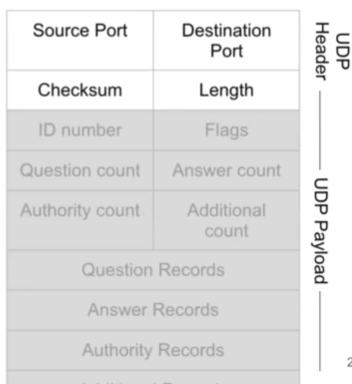
For performance reasons, DNS uses UDP. It is designed to be lightweight and fast; TCP would require too many handshakes for a recursive query.
- Source port: chosen by the client (and can be randomized for security)
- Destination port: DNS name servers usually answer requests on port 53
- Checksum: ensures payload wasn’t corrupted
- Length: length of message
- ID number: associates queries with responses. Should be randomized for security
- Counts: number of records for each type in the DNS payload
- Each type of resource record (RR) is a name-value pair
- A (answer): maps domain to IPv4
- NS (nameserver): designates another DNS server
- AAAA: ipv6 answer
- CNAME: maps one domain to another domain
- MX: mailservers
- Four main record sections:
- Question records: what is being asked
- Answer records: IPv4 mappings
- Authority records: redirections (NS)
- Glue records: additional info
DNS Attacks #
Cache Poisoning: when a malicious record is returned to a client, and is cached by the client.
- If the cache of a recursive resolver is poisoned, then all users will also be attacked.
- Example: supplying a malicious A record mapping the attacker’s IP to a legitimate domain
Malicious Nameservers: nameservers controlled by attackers can give bad responses
- Defense: Bailiwick Checking: resolver only accepts records if they are in the same zone
- Example:
[berkeley.edu](http://berkeley.edu)can provide[eecs.berkeley.edu](http://eecs.berkeley.edu)but notstanford.edu - If an alias redirects to a domain that’s in a different zone, go back to the root server and start a new query
- Example:
MITM Attacks: On-path attackers can inject bad responses, beating the original response
- Example: China firewall
Off-path attacks: Off-path attackers need to guess the ID field in order to spoof a response. DNS requests need random ID numbers to prevent these attacks.
Kaminsky attack: Glue records are cached, so it’s possible to poison the cache by making bad additional records and making recursive resolvers store them. (i.e. attacker f
- Solution: randomize the source port (adds 16 bits to guess)
- Solution: glue validation: don’t cache glue records
DNSSEC #
Securing DNS Lookups #
DNS results are public (so we don’t need confidentiality at all), but we do want integrity on the response.
- One strategy is to serve DNS requests over TLS. This secures the communication channel (channel secure), but does not provide object security (securing the piece of data that’s actually being transmitted).
- This is not that useful because it provides confidentiality.
DNSSEC (DNS Security Extensions) do ensure integrity on the results.
- It cryptographically proves that answers are correct.
- Validates trust using a hierarchical, distributed trust system
- Is backwards compatible, and works with older nameservers that only support regular DNS
- OPT pseudosection is checked for presence before continuing.
Basic Idea: send signatures and certificates with records.
- Only 1 trust anchor that’s implicitly trusted (the root nameserver). Its public key is hard-coded into resolvers.
- Parents can delegate trust to children.
- A constrained path of trust establishes trust relationships in which only several entities (subdomain, domain, TLD, root) need to be trusted, rather than the entire web.
Usage: DNSSEC is not used for name records (saying that the IP address of a domain is some value). Rather, it is used for verifying that communications from nameservers come from the desired sender.
Resource Record Sets (RRSETs) are a group of DNS records with the same name and type. RRSETs can be signed all together. RRSETs require new record types:
- RRSIG (resource record signature) contains additional metadata (type, algorithm, labels, valid to and from dates…)
- DNSKEY (public keys)
- DS (delegated signer) used to encode the hash of the child’s public keys (used to delegate trust)
Takeaway: cryptographic protocols require a lot of metadata to function correctly! DNSSEC is relatively simple compared to other schemes.
Denial of Service #
Availability is the property of allowing a service on a network to be available for legitimate users.
A Denial of Service (DoS) attack disrupts availability by making services unavailable.
DoS Strategies #
- Exploiting program flaws: use buffer overflows, SQL injections, etc. to shutdown systems and delete databases.
- Resource exhaustion: Consume limited resources on the server to prevent legitimate users from accessing them.
- Bottlenecks: Overwhelm the point in the system that has the smallest throughput.
DoS Targets #
Application-level: target the resources that the application uses
- Relies on asymmetry (consume large amount of resources from small input) and volume (send lots of requests)
- Resource consumption ideas:
- write junk to disk until it runs out of space
- fork bomb
- spam disk IO operations
- choose worst-case inputs to execute algorithmic complexity attack
- Example: store everything into a single bucket in hashtable
Network-level: target internet access
- Overwhelm bandwidth, such that all of the internet traffic is the attacker’s
- DDoS (Distributed Denial of Service): use multiple systems to overwhelm target system; create a botnet of compromised computers controlled by attacker
- Amplified DoS: attacker sends small request to a service, which amplifies the request into a large amount of data to send to a victim
- Can only be done with UDP (TCP spoofing is hard)
- SYN Flooding: exploits many TCP connections by sending lots of SYN packets (expensive for server), but never sending ACK
- Solution: SYN Cookies: don’t store state and only do work until ACK is received. State is sent back in the SYN-ACK packet (sequence number equal to encoded state), and never saved by the server.
DoS Defenses #
- Identification: distinguish requests from different users (e.g. authentication)
- Isolation: ensure users cannot affect other users
- Quotas: ensure users can only access a certain proportion of resources
- Proof of work: force users to spend resources to issue requests (CAPTCHAs…)
- Overprovisioning: allocate a large amount of resources, taking advantage of economies of scale and preventing small-scale attacks
- Very common defense in practice (use CDNs which reroute traffic to cache servers)
- Egress Filtering: ISPs limit ability to spoof packets by only trusting their own, preventing amplified DoS
- Packet Filtering: discard any packets that are part of a DoS attack
- Needs to be done before the bottleneck (i.e. bandwidth)
- Can be included into firewall
- Can be subverted by breaking up packets for reassembly on the other end (longer TTLs, TCP…)
Firewalls #
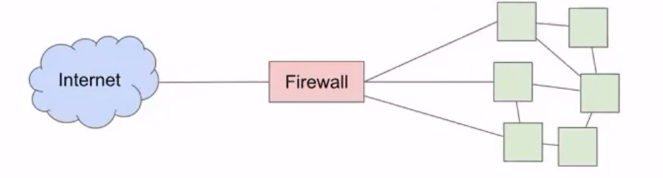
Firewalls are scalable defenses that provide a single point of access in between the internet and all devices in a network.
Security Policies #
Firewalls have outbound policies (what can go out of the network) and inbound policies (what is able to enter the network).
A typical home network has:
- Outbound policies: allow any outbound traffic, so users can connect to any service
- Inbound policies: deny all inbound traffic except in response to an outbound connection, or for trusted services such as SSH
Default-allow is more flexible, but more vulnerable; default-deny has fewer flaws but has a poorer user experience.
Some example rules:
allow tcp connection 6.1.6.1:* -> 1.2.3.4:80allows all connections from 6.1.6.1 to port 80 of 1.2.3.4allow tcp connection *:*/int -> *:80/extallows all outbound connections with destination port 80allow tcp connection *.*/ext -> 1.2.3.4:80allows all inbound connections with destination port 80
Types of Firewalls #
Proxy firewall: form a TCP connection between the server and firewall, which creates more overhead but avoids packet problems.
- Can also be implemented on the application level
VPN: allows direct access to an internal network via external connection
- Creates encrypted tunnel
Pros and Cons of Firewalls #
Pros:
- Central management of security policies (offers single point of control)
- Transparent operation to end users
- Mitigates security vulnerabilities on end hosts
Cons:
- Reduced network connectivity
- Vulnerable to insiders
Intrusion Detection #
Path Traversal Attack: Users can access unauthorized files by exploiting UNIX file paths. For example, if the backend is looking in /home/public, a user can query for ../private/etc to get private files.
Network Intrusion Detection System (NIDS): monitors all network traffic
- Table of all active connections and their states
- Used to detect and analyze attacks
- Small TCB (only detector is trusted) and easy to scale, but has inconsistent interpretation between the detector and end host (needs to figure out context, encrypted text, possible conversions…) → susceptible to evasion attacks
- Also vulnerable to code injection attacks
Host-Based Intrusion Detection System (HIDS):
- No encryption needed
- Fewer inconsistencies (directly sees everything the host also does)
- Harder to overwhelm since one exists on every end host
Drawbacks:
- Can be very expensive (need to install one per host)
- Evasion attacks are still possible (path traversal, etc)
- Any devices that don’t have HIDS are vulnerable
Logging: Analyze log files generated by end systems
- Cheap
- Consistent
Drawbacks:
- Not realtime
- Can be modified by attackers
Detection Errors #
False Positive (type 1): alerted when no attack occurred
False Negative (type 2): fails to alert when there is an attack
False Positive Rate (FPR): Probability of alert given no attack
False Negative Rate (FNR): probability of not alert given attack
There is often a tradeoff between false positives and false negatives. Which side to lean towards depends on the situation and cost of false positives vs cost of false negatives.
Detection Styles #
Signature-based: match activities to structures of known attacks (blacklisting)
- Example: alert on any inputs that contain
..to detect path traversal - Simple, good at detecting known attacks, easy to build up library of signatures.
- Can’t catch new attacks, variants, and can generate lots of false positives.
Specification-based: specify allowed behavior and deny everything else (whitelisting)
- Example: only allow alphanumeric inputs to prevent path traversal
- Can detect new attacks, low false positive rates
- Specifying all proper behaviors is rather difficult
Anomaly-based: develop a model of what normal activity looks like (opposite of specification-based)
- Analyze past attacks to see common patterns
- Very difficult in practice, and can fail to detect attacks
Behavioral: look for evidence of compromise
- Don’t look for attack, look for exploitation
- Example: see if private file was attempted to be accessed to stop path traversal attacks
- Only detects successful attacks
Vulnerability Scanning: probe your own systems with many known attacks and fix anything that is successful
- Red Teaming: hire attackers to break into system with permission
- Accurate, proactive, intelligent
- Can take a lot of work, not helpful for systems you can’t modify, dangerous for testing disruptive attacks
Honeypots: things that exist with the sole purpose of being compromised
- Similar to stack canary
- Distracts attackers from legitimate targets
- Takes significant work to make convincing honeypots
Forensics: analyze what happened after a successful attackj