 ben's notes
Web Security
What is the Web? #
The Web is a platform for deploying application and sharing information portably and securely.
HTTP #
HyperText Transfer Protocol is a common data communication protocol on the web.
- Clients make a resource request to a specific URL (see below for an example).
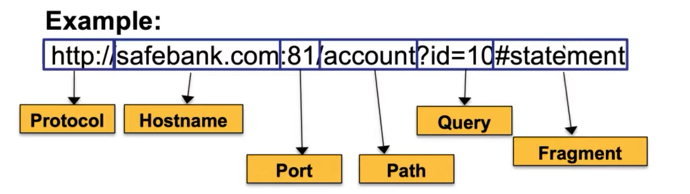
- An HTTP request has a method (GET, POST..), a path, and some headers (like version, date, content type…)
- A HTTP response primarily has a status code (200 OK) with some more headers.
HTML/CSS/JS #
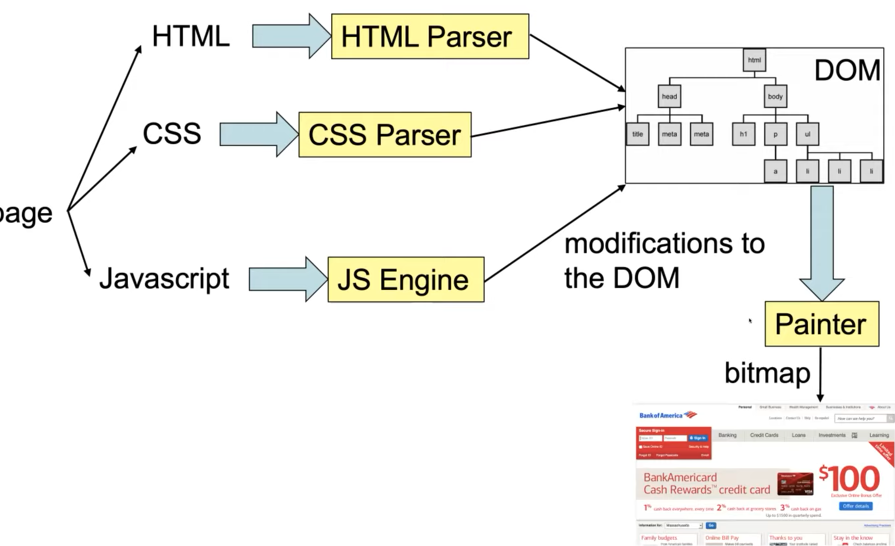
HTML specifies the layout, CSS specifies the style, and JS specifies the behavior. All three work together to modify the DOM (Document Object Model) of a webpage, which is then sent to a painter that outputs an image on the screen.
Desired Security Goals #
The web was not built with security first, so many issues exist and need to be addressed, especially as the web becomes more complex over time. More specifically:
- Integrity: malicious websites should not be able to compromise computer or other websites
- Confidentiality: malicious websites should not be able to get confidential information from other sources
- Privacy: malicious websites should not be able to learn about online activities
- Availability: attackers cannot take down websites
Same-Origin Policy (SOP) #
In the web browser, each site is isolated from the others by a security barrier. In other words, resources from different origins cannot access affect each other.
An origin consists of a protocol (http), hostname (google.com), and port (80). Typically, this is derived from the URL.
- Default ports are 80 for HTTP and 443 for HTTPS
Within a webpage, resources can come from different origins (for example, an image could be loaded from images.google.com). In addition, webpages can contain iframes that hold an entire view from other origins.
Exceptions to Same-Origin Policy include:
- Javascript (runs within origin of whichever page loads the script)
- Images have the origin of the page that it’s loaded from
- Frames have origin of specified url
Cookies #
HTML is largely stateless, so we need to store cookies in order to persist information across sections.
When the browser connects to a server it previously connected to, it will attach all of the cookies to the session.
To set cookies, the header can be made as following:
Set-cookie NAME=VALUE; domain = (when to send); path = (when to send); secure (SSL only?); non-secure (opposite of secure); expires = (expiration); HttpOnly (cannot access in JS)
Cookie Policy #
Cookie policy has two parts:
- What’s the scope for the cookie (on a URL-host name server)?
- The scope can include a general domain suffix (
domain=".site.com"). This must be a suffix that is not a TLD (.com), and this cookie will be loaded for all sites that end in that suffix.
- The scope can include a general domain suffix (
- What cookies will be sent to a particular URL?
- Respect domain suffixes
Indirectly bypassing same-origin policy using cookie policy: Since cookie policy takes precedent to same-origin policy for cookies, sensitive information can be easily sent between sites that are not allowed to communicate under same-origin policy.
Session Tokens #
When authenticating with a site, we don’t want to have to type in our passwords every single time.
Session Tokens allow us to persist a login state by storing a secret value:
- On initial login, a user with valid username and password receives a session token
- Sever associates login with session token
- For future requests, attach session token into request
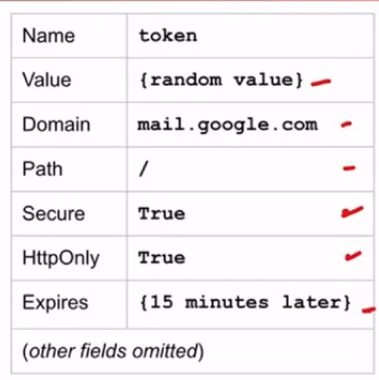
To generate the secret value, use a HMAC on the username with a secret key.
Web Security Attacks #
SQL Injection #
Let’s say that we have a function that takes in a URL query and converts it to a SQL query:
func getItems(w http.ResponseWriter, r *http.Request) {
	item := r.URL.Query()["item"][0]
	query := fmt.Sprintf("SELECT name, price FROM items WHERE name = '%s'", itemName)
	row, err := db.QueryRow(query)
}
Since the input is unprotected, attackers could create undesirable behaviors. For example, if an attacker inputted a single quote, then they could close the quote early and append whatever code they wanted to the end (including a semicolon, where any subsequent query can be added).
Defenses #
Input Sanitization: disallow or escape special characters, such that everything inputted is treated as a single string in SQL. This has the main drawback that it is difficult to handle every edge case.
Prepared statements: put a question mark into the query, and this will be replaced after parsing:
row, err := db.QueryRow("SELECT name, price FROM items WHERE name = ?", itemName)
The primary drawback of prepared statements is that it’s not a standard feature of SQL, so it relies of implementation-specific details.
Similar Attack: Command Injection #
The system syscall will parse a string as a command. If this command is dynamically created based on user input, then it is possible for the user to run whatever command they want.
Cross-Site Scripting (XSS) #
Cross-site scripting occurs when scripts are injected into sites. As an example, observe the Go script below:
func handleWeb(w http.ResponseWriter, r *http.Request) {
	name := r.URL.Query()["name"][0]
	fmt.Fprintf(w, "<html><body>Hello %s!</body></html>", name)
}
Here, it is possible to write whatever HTML you want into name, including a <script> tag.
Stored XSS occurs when malicious scripts are stored on otherwise legitimate servers. As an example, if someone stores a script into their Facebook profile pic, anyone who loads their page will also load the script.
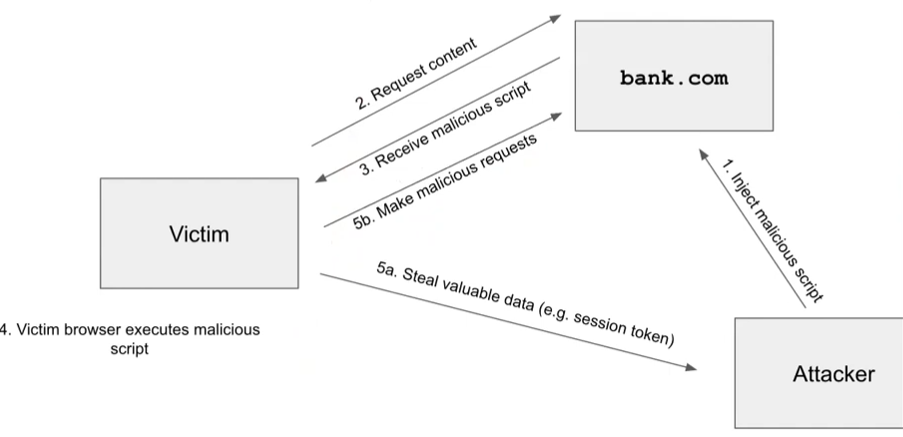
Reflected XSS occurs when malicious code is reflected back to users when they navigate to a particular URL. For example, a user could try navigating to google.com/search?q=<script>alert(1)</script>).
XSS Defenses #
HTML sanitization: disallow greater than or less than signs by converting them to their escaped equivalents (<, >, ", etc). There are trusted libraries to automatically do this.
Content Security Policy (CSP): Instruct the browser to use resources loaded only from allowed domains. (e.g. disable all inline scripts). However, this relies on the browser to enforce security.
CSRF (Cross-Site Request Forgery) #
Idea: Trick a victim into making an unintended request.
- User authenticates to the server and receives a valid session token into a cookie.
- Attacker prompts victim into making a malicious request to the server.
- The server accepts the malicious request from the victim
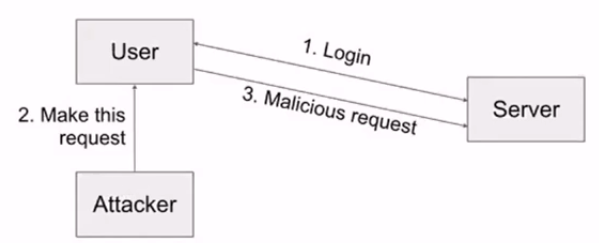
Strategies to execute attack:
- Trick users into clicking a malicious link
- Embed link into HTML that users will visit
- Malicious advertising: pay for iframe on webpages, embed malicious JS
CSRF Defenses #
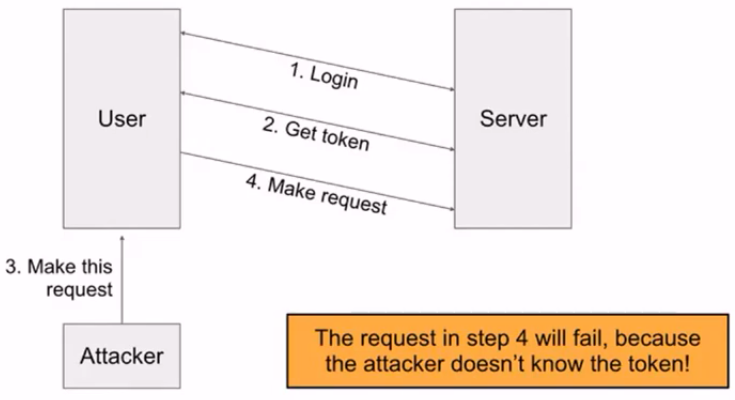
CSRF Tokens: A secret value sent to the user from the server. All requests must match that secret value, and it must be sent somewhere else (e.g. POST request, header, GET parameter).
Referer Header: a header in an HTTP request that indicates which webpage made the request. If the referer doesn’t match the expected URL, then reject it.
- Not always effective; it may be removed due to leaking private information, or by firewalls/privacy settings.
SameSite Cookie Attribute: If SameSite=Strict then a cookie will be sent only if the domain exactly matches the domain of the origin. (This is not yet implemented on all browsers, and relies on client-side behavior.)
UI Attacks #
Main Idea: Tricking a victim into thinking they are taking some intended action, when they are actually taking a malicious action.
Clickjacking #
Browsers assume that clicks come from the user and should be trusted. Clickjacking tricks users into clicking onto something served by the attacker.
- A prominent example is ads that have a download button in them.
- Another example is to make an iframe completely transparent, so when the user thinks they are clicking on something from the current website, they are actually clicking on the iframe.
- ‘Click’ could also refer to a keypress (such as entering passwords, etc. in malicious origins).
- Temporal attack: right as a click comes in, the website changes its layout and the user ends up clicking on something else.
- Cursorjacking: hide the real cursor, and show a fake cursor that doesn’t move exactly where the real one is.
Clickjacking Defenses:
- ensure clear visual separation between important dialogs and content. (Pop out alerts that aren’t part of the webpage, etc.)
- require confirmation from users
- Temporal integrity: delay actions by a small amount of time (e.g. hiding the OK button) so temporal attacks don’t work as well
- Frame-busting: prohibit other websites from embedding iframes
Phishing #
Tricking victim into sending attackers personal information in a way where victims cannot distinguish between the malicious website and the real website.
- Homograph attack: create malicious URLs that looks similar
- Browser-in-browser attack: simulated browser inside of an attacker’s website
- Password Reuse: users reuse passwords, and it might end up in an insecure database that gets hacked
- Relay attacks: a method of circumventing 2FA by intercepting requests for multiple factors and relaying it to a user on a malicious website