 ben's notes
Floating Point
Some Number Representations #
First, some cool bit stuffs #
- Easy way to check equality of
xandy:x - y 0orx ^ y 0 - Logical vs. arithmetic right shift:
- Logical doesn’t preserve leftmost bit (always just adds 0 to the end)
- Arithmetic preserves most significant bit (so that it’s better for Two’s complement)
- Left shift to multiply by 2
- Right shift to divide by 2
Alternative representations #
Sign/Magnitude representation: The most significant bit is always the sign, no numerical information is stored here. (Different from Two’s complement in that there are now two zeroes, and the ranges of positive and negative numbers are symmetric)
Bias representation: If we want to represent ranges of numbers that are not centered at 0, then what we can do is remember to add a constant amount to convert back, or subtract a constant amount to convert into a standard binary representation.
Floating Point Representation #
Now, let’s take a look at how we can represent:
- Decimals
- Huge numbers
- Wide ranges of numbers
Fractions #
Suppose we have a number 10.2358. How would we represent this in bits?
First, we need to convert this to binary. Then, we can represent this in the same format, xx.yyyy, where xx represents the positive powers of 2, and yyyy represents the negative powers of 2.
There is a concern here: if we represent the stuff to the right of the decimal point more precisely, we lose the range in which we can represent larger numbers. Fixed Point representation keeps this range constant regardless of the numbers that are entered.
We can extend this idea by introducing a floating point, in which a number stores the position of the decimal point, such that it can change dynamically based on how big the number is.
The standard way of representing floating point numbers is the standard form:
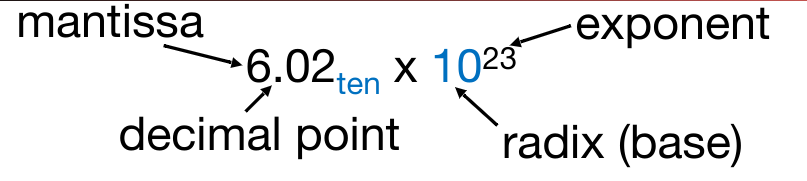
There is exactly one number to the left of the decimal point, and the power is stored in a separate area.
The IEEE 754 Floating Point Standard #
This is the standard for all arithmetic real numbers stored on computers. Here are some goals:
- Keep as much precision as possible.
- Help programmers deal with arithmetic errors (infinity, NaN, overflow…)
- Encode in a way that is compatible with Two’s Complement.
IEEE 754 Single Precision Floating Point Standard:
- 32 bits total
- 1 bit for sign
- 8 bits for exponent (E) with bias -127
- 23 bits for fraction (F)
- Implicit leading one: If the number didn’t start with 1, then we could have adjusted the exponent. Therefore, there must always be a 1 there to maximize the range of possible numbers represented.
- Total range: $2.0 \times 10^{-38}$ to $2.0 \times 10^{38}$

The significant is also known as the mantissa. The exponent is biased by -127 (so that we can represent negative exponents without Two’s Complement).
The Double Precision Standard:
- 64 bits rather than 32
- 1 bit for sign
- 11 bits for exponent with bias -1023
- 52 bits for fraction with extra implicit leading 1
- Total range: $2.0 \times 10^{-308}$ to $2.0 \times 10^{308}$
Sorting Floating Point Numbers #
The standard form makes it relatively easy to sort floating point numbers. Here’s how:
- Sort by sign (group positive numbers and negative numbers together)
- Sort by exponent: bigger exponents = bigger number
- Within exponents, sort the mantissa as if they were positive integers.
Denormalized Floating Point #
One issue with the floating point specification is that there’s a gap near 0 where we can’t represent some very small numbers. One way to alleviate this is to introduce the idea of denormalized numbers.
Some differences between denorm and normal:
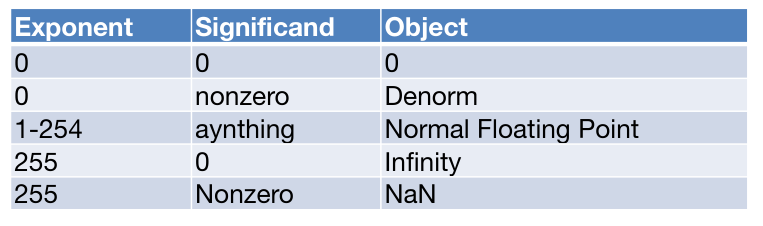
- Denormalized numbers have an exponent of all 0’s.
- The exponent is implicit. It’s equal to $bias+1$. (for example, -126 in single float)
- Denormalized numbers do not have an implicit leading 1.
- The smallest possible denormalized number is $2^{implicit\\ exponent} \times 2^{bits\\ in\\ mantissa}$.
Issues with Floating Point Numbers #
If a number gets too large, then we get overflow- our exponent becomes greater than the limit.
We can also get underflow if the negative exponent becomes too small.
Special Exponents
- All zeroes: Very small numbers
- All ones: NaN
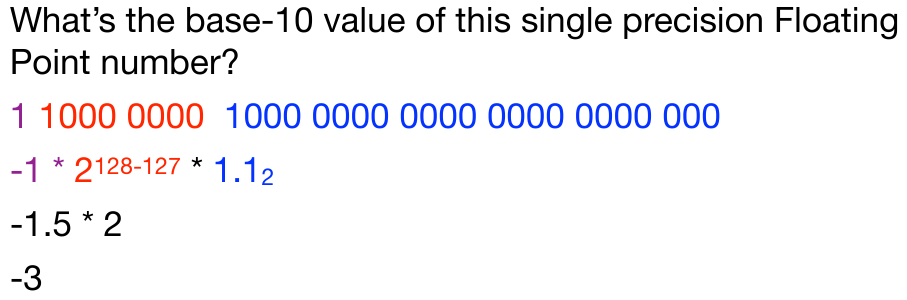
Example #
Converting from Decimal to Floating Point #
For the following examples, we’ll be using an example of 16.375.
1. Identify type of floating point value (0, denorm, standard floating point, infinities, or NaNs) (if possible); this is mostly useful when you have the binary values and are attempting to type it. 2. For standard floating point to binary:
Identify the sign; for 16.375, that is positive indicating a sign bit of 0; negative would indicate 1.
Convert entire number before the decimal point to binary. (E.g. 16.375 will be 0b10000.TBD)
16.375
0b10000.TBD
Then convert the digits after the decimal place to binary such that each bit is 2n1 where n is the place of that bit. (e.g. ##.375=>0.375=0∗21+1∗221+1∗231=>0b10000.011).
$\frac{1}{2^n}\#\#.375 => 0.375 = 0 * \frac{1}{2} + 1 * \frac{1}{2^2} + 1 * \frac{1}{2^3} => 0b10000.011$
You then shift the decimal place over until you have a 1 in the MSB. You are try to shift the binary representation in order to get the 1.XXX…XXX format. Count the number of times it moves over and put that as the power of 2. (In this example, 0b10000.011=>0b1.0000011∗24 [we had moved the decimal place over 4 times]). This has given us two things: the mantissa (all bits after the decimal place [aka.
0b0000011in this example], and thepower[aka.4from the term 24]).0b10000.011 => 0b1.0000011 * 2^4
2^4
Finally, you need to find the exponent bits. We find the power by plugging in our equation
exp + bias = power, we have thepower(from the previous step: 4 from the term 2^424) andbias(given by the floating point representation) so we just need to subtract the bias from the power to find the exponent. (E.g. 2^424 has apowerof 44 so: 4 - (-31) = 35 => 0b1000114−(−31)=35=>0b100011. This is our exponent bits.)Build the FP binary:
[SIGN BIT] [EXPONENT BITS] [SIGNIFICAND BITS]; our example gives us0b0 100001 0000011000000000000000000.You can always go and check if your values are correct by applying the following equation: (−1)sign∗2Exp+Bias∗1.significand23. For denorm to binary, the rules are similar—figure out the base value of the significant and then how much it needs to be shifted by the exponent in order to obtain the correct value and adjust the exponent by subtracting the negative bias. 4. For all other types of values in binary to standard value, break down the initial binary value given into the sign, exponent, and significand.
$(-1)^{sign} * 2^{Exp + Bias} * 1.significand_2$
Sometimes you may find it difficult to find the binary representation of the decimal value. Here is a guide for how you can figure out what the binary equivalent is.