 ben's notes
Memory, Pointers, Addresses
TL;DR #
All data is in memory. Each memory has an address and a value.
Pointers are an abstraction of a data address. (Because C does no bounds checking on pointer arithmetic, the model described here is the direct enabler of the attacks studied in Memory Safety Vulnerabilities.)
- Use
*to get a value from a pointer. - Use
&to get the address of a value.
Memory #
In C, all memory is in one single, large array of bytes
- Starts at 0, ends at 0xFFFFFFFF (32 bit architecture)
- Each cell has an address and stores a value
Word size: a natural chunk of bits big enough to store the address. Usually the same size as the address length
Pointers #
A pointer is a variable that contains the address of a variable.
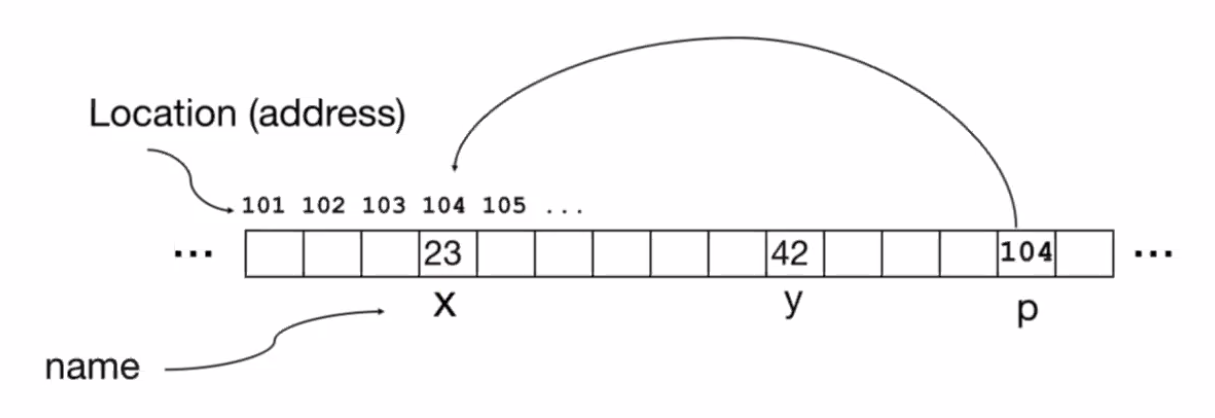
Example: $p$ is a variable containing the value 104. This happens to be the address for $x$ (at which the value 23 is stored), so we can say that $p$ is a pointer to $x$.
Pointers can be used to point to any type of data, but normally we declare the type of the pointer to restrict it.
Some pointer examples #
int *p is a pointer to an integer.
int **p is a pointer to a pointer to an integer.
(You can continue this indefinitely, e.g. int **********p)
void * is a generic pointer that can refer to any type. Avoid when possible.
int (*fn) (void *, void *) is a pointer to a function fn that takes in two parameters. We can call this function using (*fn)(x,y).
Initializing a pointer:
int *p; # declare pointer
p = &x; # set p to point to x
*p = 3; # write 3 into the location of x
int y = *p; # copy value at address p to variable y

p = x; # set the address pointed to by p to the value of x (GARBAGE)
A pointer of all 0s is the NULL pointer. Writing or reading from a null pointer will immediately crash the program (this is not a valid operation).
- Testing for null pointer is easy:
if(!p)will be true ifpis a null pointer.
Pointers and Structures #
Point p1;
Point p2;
Point *paddr = &p1;

/* arrow notation */
int h = paddr -> x; // get x of object pointed to by paddr
int h = (*paddr).x; // same thing, but dereferenced
int h = p1.x; // gets the same exact value too
Arrow notation = dealing with pointer to a structure.
Dot notation = dealing with the structure itself.
Pointer equality #
int x = 1
int *p = &x
int *q = *p
p == q // FALSE, the pointers exist at different locations in memory
*p == *q // TRUE, p and q both point to x
Pointers to addresses #
char *foo(char *a, int b) {...} //function that takes in a string and integer
char *(*f)(char *, int) // pointer to a function that takes in string+int
f = &foo //assign foo to f
printf("%s\n", (*f)("cat", 3)) // call f
Why use pointers? #
C is a pass by value language: so if we want to pass a large amount of data, it’s faster to pass the pointer in rather than the entire object. Otherwise, we’d need to copy a lot of data.
Low level access: manually reference points in memory to increase efficiency and flexibility
Pointing to Different Size Objects #
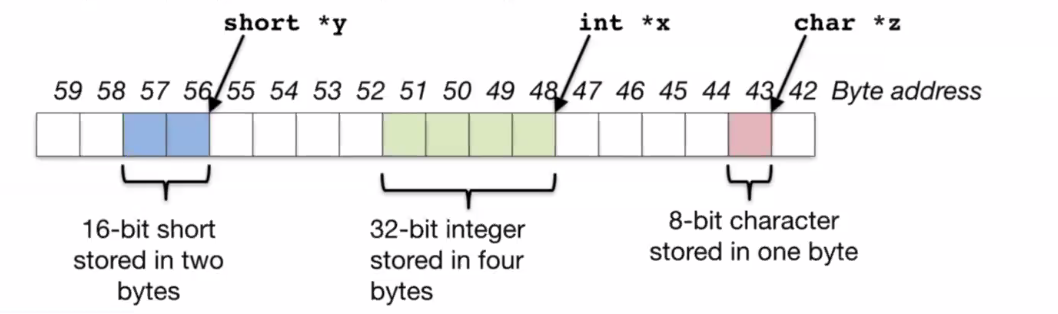
The type of a variable determines how large the object is (how many bytes to read after a given pointer).
The number of bits in a byte is not standardized (but normally 8).
sizeof(type) returns the number of bytes for that particular type. By definition, sizeof(char) == 1.
When you increment a pointer (e.g. p += 1), that pointer increases by the size of the pointer type! So if the definition was int *p, the pointer address would increase by 4 rather than 1. Pointer arithmetic should be used cautiously.